
Automatically Pay Extra Time Beyond Scheduled Hours
Table of Contents
By default, TimeWellScheduled is designed to require approval for any worked time beyond the scheduled shift.
For example, if an employee is scheduled from 9:00 AM to 5:00 PM but clocks out at 5:30 PM, their timecard will record the full 8.5 hours worked — but only 8 hours will be marked as paid until a manager approves the extra 30 minutes.
If you’d like the system to automatically include this additional time, you can enable rounding to the next 15-minute increment:
-
- Go to MANAGE MY BUSINESS
- Go to MANAGE MY PAYROLL, SHIFTS AND LABOUT RULES
- Enable the setting to “Round PAID timecards to the next fifteen-minute increment”
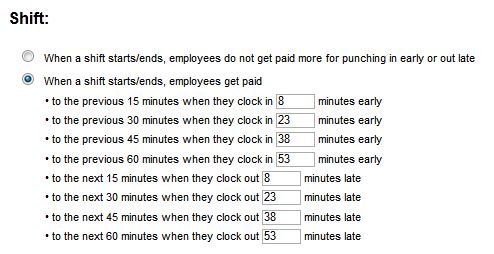
- Set the threshold (in minutes) for when rounding should apply
Once enabled, the system will automatically round an employee’s PAID time up to the next 15-minute interval when they check in or out within your defined threshold — saving you from manually approving minor time extensions.