
< All Topics
How do I print off a daily schedule sheet?
Updated
Views29
Table of Contents
You can print a daily schedule by going to the WHO’S WORKING menu item and clicking print.
If you need to print for a future date, you can
- Go to SCHEDULING
- Click off the departments to show (or all if needed)
- Click the DAY button

- Change to the day you want to view
- If you want to show JUST those working, go to settings and check to HIDE those not working
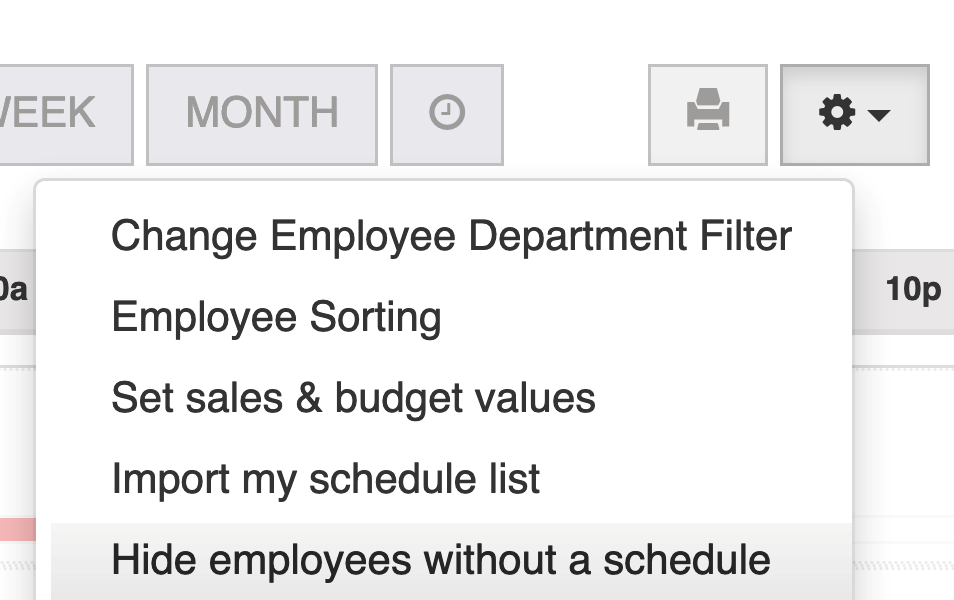
- Click PRINT
Search
Categories
-
Absence34
-
Access Restrictions9
-
Accounting5
-
Alerts29
-
App – Employees4
-
App – Punch Clock13
-
Availability13
-
Biometrics12
-
Chat6
-
Competency6
-
COVID7
-
Departments9
-
Did You Know5
-
Employee Management19
-
For Employees19
-
For Managers16
-
General29
-
Getting Started5
-
How-To18
-
HR Suite43
-
Messages21
-
Multiple Instances2
-
Offline Mode0
-
Payroll44
-
Printing3
-
Project Tracking5
-
Punch App2
-
Punch Clock2
-
Punching23
-
Reports21
-
Roles13
-
Scheduling77
-
Security23
-
Shifts9
-
Statutory Holidays12
-
Survey3
-
Time Cards60
-
Videos33
-
Vital Signs2
-
Walk Thru1
-
What's New57
-
Who's Working7