
< All Topics
Open Shifts – How to Enable
Updated
Views59
Table of Contents
An open shift is a scheduled shift that hasn’t been assigned to any employee yet. Team members who are eligible for that role can view the open shift and choose to “take” it, allowing for flexible scheduling and quick coverage when extra help is needed.
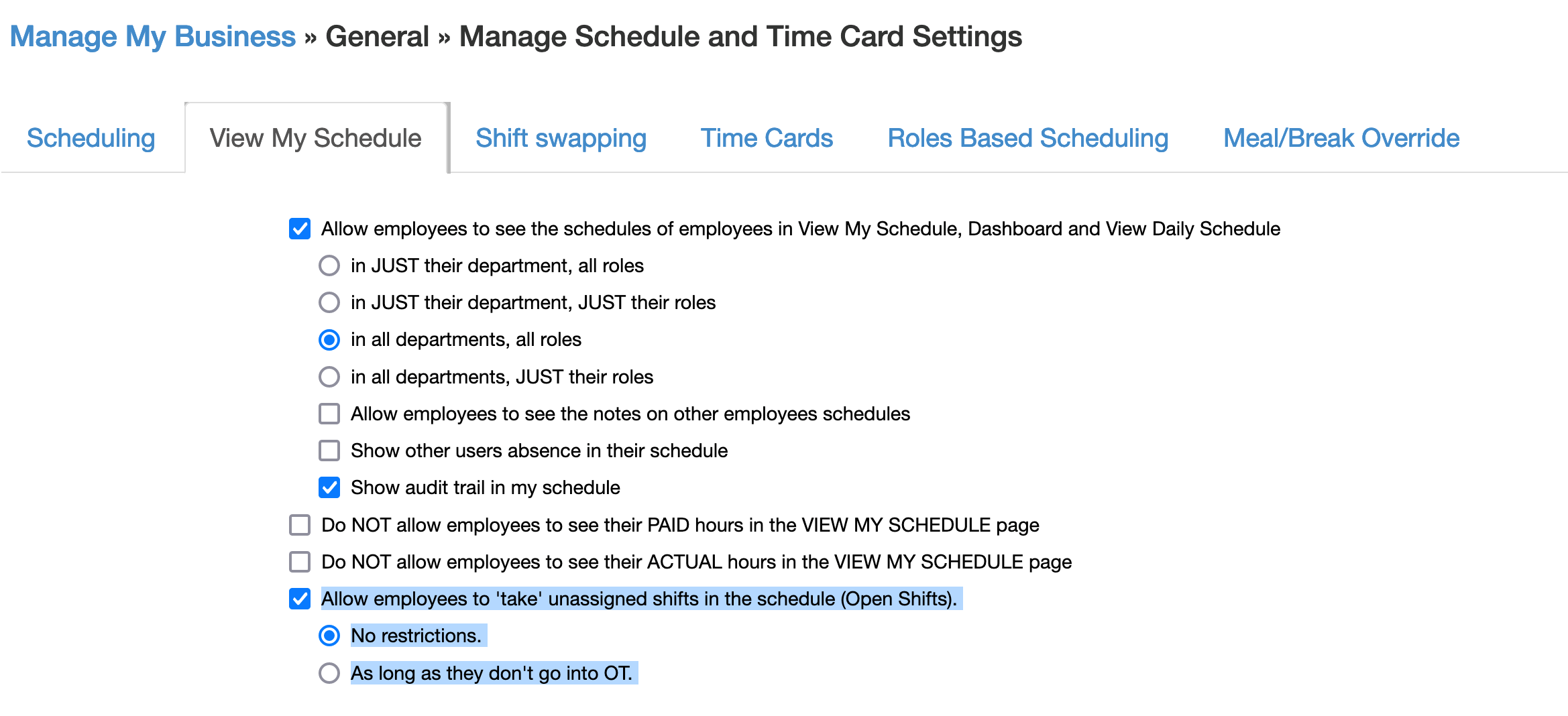
To enable Open Shifts
- Go to MANAGE MY BUSINESS
- Go to MANAGE SCHEDULE AND TIME CARD SETTINGS
- Go to the VIEW MY SCHEDULE tab
- Enable OPEN SHIFTS
Search
Categories
-
Absence34
-
Access Restrictions9
-
Accounting5
-
Alerts29
-
App – Employees4
-
App – Punch Clock13
-
Availability13
-
Biometrics12
-
Chat6
-
Competency6
-
COVID7
-
Departments9
-
Did You Know5
-
Employee Management19
-
For Employees19
-
For Managers16
-
General29
-
Getting Started5
-
How-To18
-
HR Suite43
-
Messages21
-
Multiple Instances2
-
Offline Mode0
-
Payroll44
-
Printing3
-
Project Tracking5
-
Punch App2
-
Punch Clock2
-
Punching23
-
Reports21
-
Roles13
-
Scheduling77
-
Security23
-
Shifts9
-
Statutory Holidays12
-
Survey3
-
Time Cards60
-
Videos33
-
Vital Signs2
-
Walk Thru1
-
What's New57
-
Who's Working7