
< All Topics
Remove Header/Footer when printing
Updated
Views13
Table of Contents
NOTE – Images/screenshots may differ from Mac to PC
Firefox:
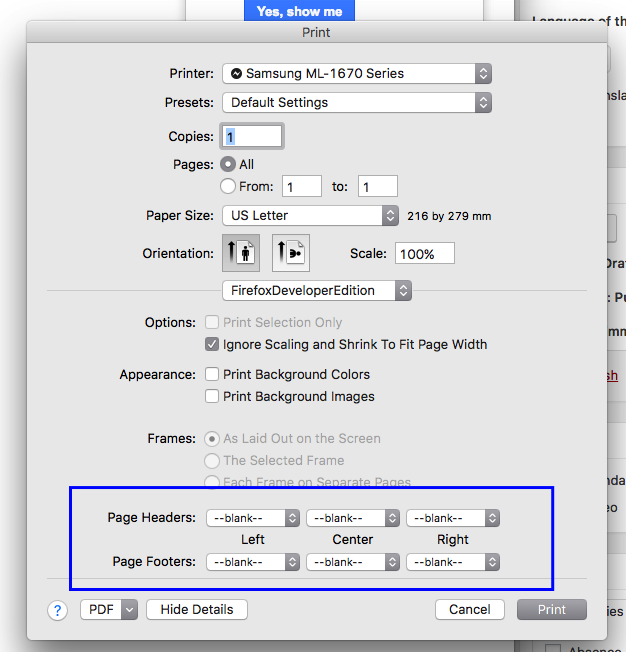
Choose File>>Print. From the window you can choose what data will fill the header and Footer from the drop down menus. If you choose to have nothing you can set them to blank.
Chrome:
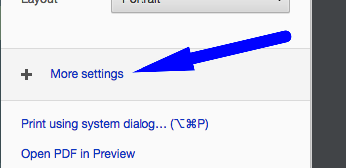
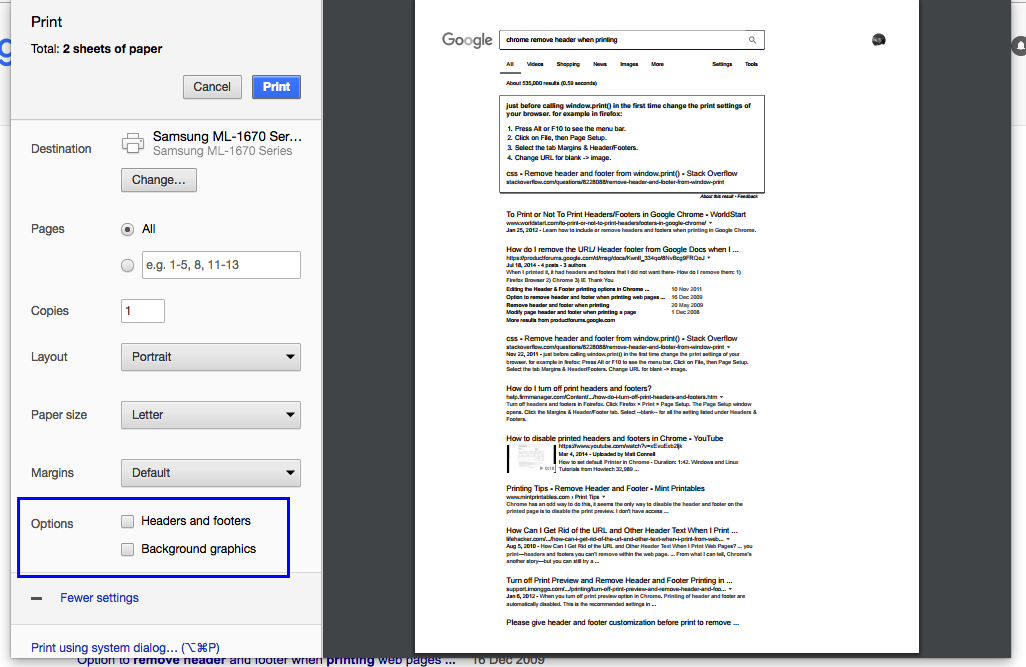
Choose File>>Print. Click on More Settings and Click Headers and Footers from the options section.
Categories
-
Absence34
-
Access Restrictions9
-
Accounting5
-
Alerts29
-
App – Employees4
-
App – Punch Clock14
-
Availability13
-
Biometrics12
-
Chat6
-
Competency6
-
COVID7
-
Departments9
-
Did You Know5
-
Employee Management19
-
For Employees19
-
For Managers16
-
General29
-
Getting Started5
-
How-To19
-
HR Suite43
-
Messages21
-
Multiple Instances2
-
Offline Mode0
-
Payroll44
-
Printing4
-
Project Tracking5
-
Punch App2
-
Punch Clock2
-
Punching23
-
Reports21
-
Roles13
-
Scheduling77
-
Security23
-
Shifts9
-
Statutory Holidays8
-
Survey3
-
Time Cards59
-
Videos33
-
Vital Signs2
-
Walk Thru1
-
What's New56
-
Who's Working7