
< All Topics
Set up grace periods
Updated
Views96
Table of Contents
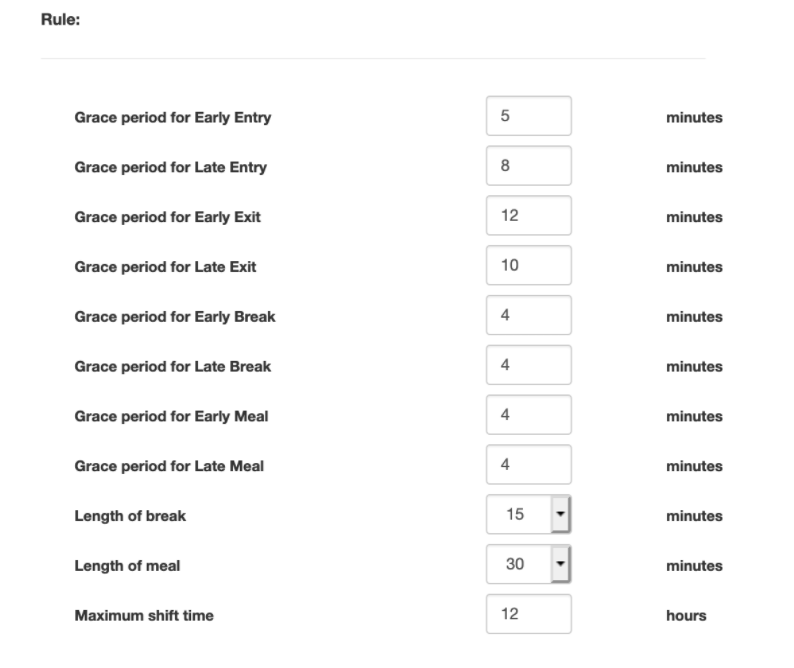
A company can be setup one of two ways to set their grace periods
Department based:
-
- Go to Manage My Business » Manage My Departments
- Find the department you want to set, click EDIT

- In the popup, set the grace periods
Shift based:
- Go to Manage My Business » Manage Shifts
- Find the department you want to set, click EDIT
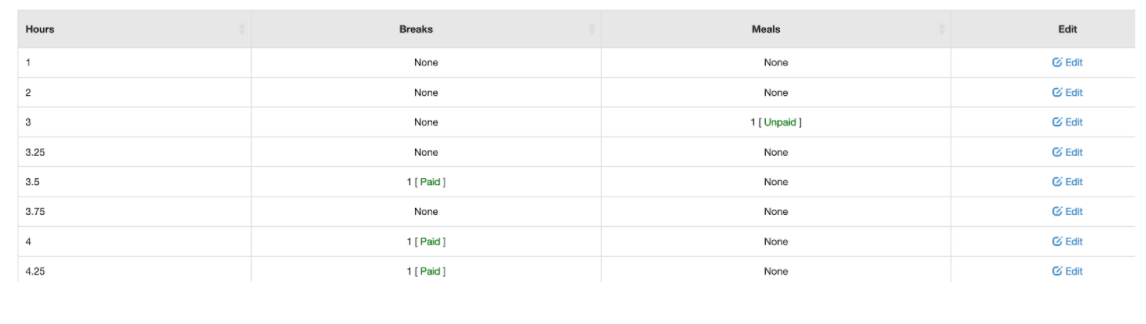
- In the popup, set the grace periods
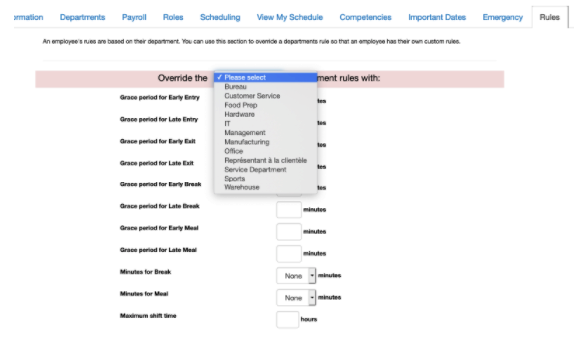
Optionally, in the employee profile, you can override the department defaults to an employee specific value. To do that, edit the employee record here under RULES:
Categories
-
Absence34
-
Access Restrictions9
-
Accounting5
-
Alerts29
-
App – Employees4
-
App – Punch Clock13
-
Availability13
-
Biometrics12
-
Chat6
-
Competency6
-
COVID7
-
Departments9
-
Did You Know5
-
Employee Management19
-
For Employees19
-
For Managers16
-
General29
-
Getting Started5
-
How-To18
-
HR Suite43
-
Messages21
-
Multiple Instances2
-
Offline Mode0
-
Payroll44
-
Printing3
-
Project Tracking5
-
Punch App2
-
Punch Clock2
-
Punching23
-
Reports21
-
Roles13
-
Scheduling77
-
Security23
-
Shifts9
-
Statutory Holidays12
-
Survey3
-
Time Cards60
-
Videos33
-
Vital Signs2
-
Walk Thru1
-
What's New57
-
Who's Working7