
< All Topics
Enable early block PER EMPLOYEE
Updated
Views15
Table of Contents
Say you have an employee who is scheduled for 9AM, but keeps arriving at 8:30AM, punching in and sitting around 30 minutes to start their shift. Although TimeWellScheduled won’t pay the extra time, there may be that employee impression.
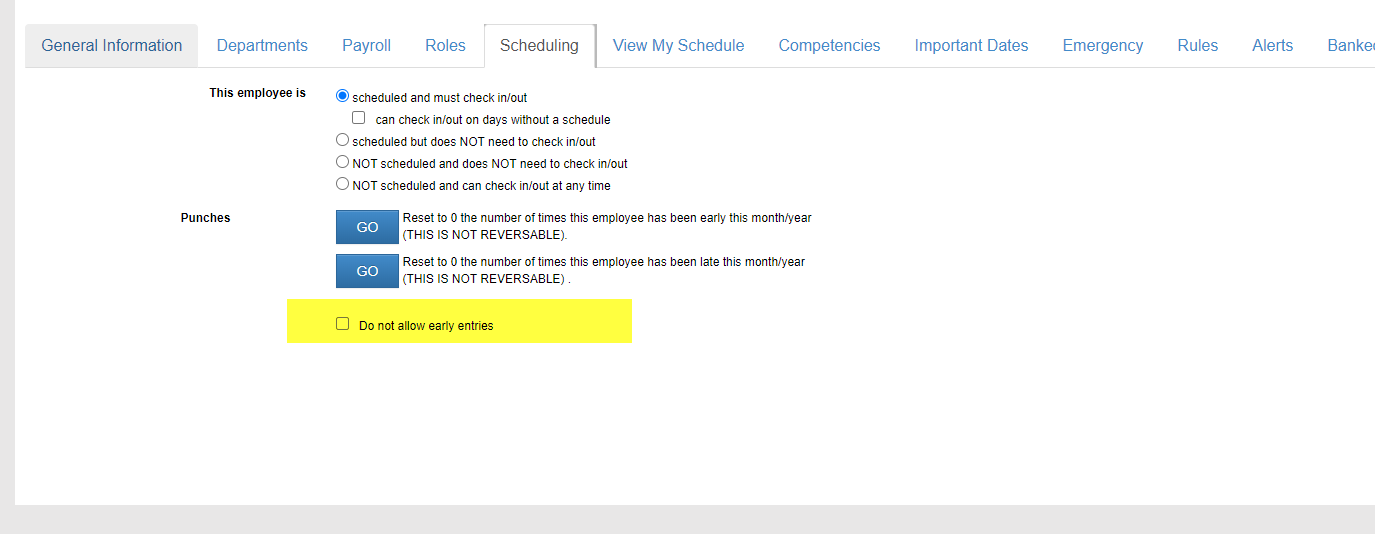
To block this, you can restrict the employee from punching in early. By doing this they will see a message they can’t clock in until their scheduled start time – grace period. Learn more here.
To enable this, go to the employee profile and turn on.
Categories
-
Absence35
-
Access Restrictions9
-
Accounting5
-
Alerts30
-
App – Employees4
-
App – Punch Clock13
-
Availability13
-
Biometrics12
-
Chat6
-
Competency6
-
COVID7
-
Departments9
-
Did You Know5
-
Employee Management19
-
For Employees19
-
For Managers16
-
General29
-
Getting Started5
-
How-To18
-
HR Suite43
-
Messages21
-
Multiple Instances2
-
Offline Mode0
-
Payroll44
-
Printing3
-
Project Tracking5
-
Punch App2
-
Punch Clock2
-
Punching23
-
Reports21
-
Roles13
-
Scheduling77
-
Security23
-
Shifts9
-
Statutory Holidays12
-
Survey3
-
Time Cards60
-
Videos33
-
Vital Signs2
-
Walk Thru1
-
What's New57
-
Who's Working7