
< All Topics
Desjardin – Initial Configuration
Updated
Views39
Table of Contents
Since Desjardins does not enforce a single structure for the application of departments, division, task, etc. It is preferable to leave the management of these functions to Desjardins.
Here is how to set up Desjardins (to be done only at the first import).
1. Start the EmployerD Web application normally.
2. After reading your Desjardins messages.
3. Go to the Import Import menu.
 4. Selected section modify import parameters.
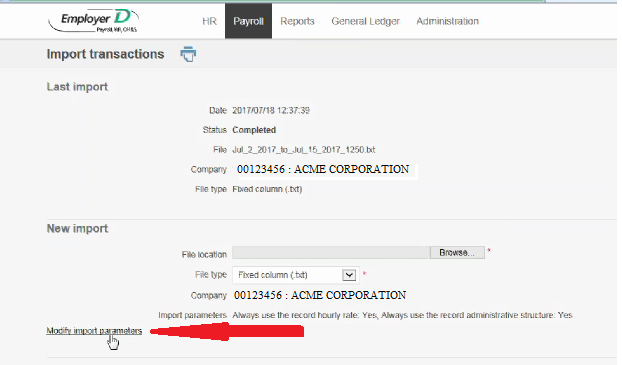 5. To have no problem with your departments, check the following 2 options
 6. Save configuration
Your Desjardins is ready to import with TimeWellScheduled
Search
Language switcher
Categories
-
Absence37
-
Access Restrictions9
-
Accounting5
-
Alerts30
-
App – Employees4
-
App – Punch Clock14
-
Availability13
-
Biometrics11
-
Chat6
-
Competency6
-
COVID7
-
Departments9
-
Did You Know5
-
Employee Management19
-
For Employees19
-
For Managers16
-
General29
-
Getting Started5
-
How-To17
-
HR Suite43
-
Messages21
-
Multiple Instances2
-
Offline Mode0
-
Payroll44
-
Printing3
-
Project Tracking5
-
Punch App2
-
Punch Clock2
-
Punching23
-
Reports21
-
Roles13
-
Scheduling78
-
Security23
-
Shifts9
-
Statutory Holidays12
-
Survey3
-
Time Cards60
-
Videos33
-
Vital Signs2
-
Walk Thru1
-
What's New57
-
Who's Working7