
< All Topics
Employees – Request time off
Updated
Views133
Table of Contents
To add an absence on the app, follow these steps.
To add an absence
- Go to ABSENCE REQUESTS
- Find the date you want to request off, click ADD

- Complete the form, click ADD
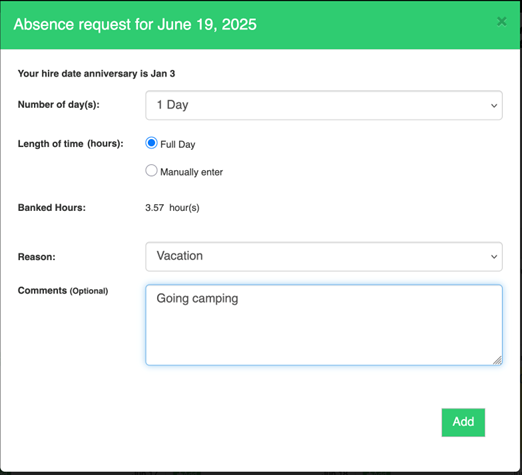
** NOTE – you will only see BANKED HOURS if the HR Suite is enabled for your company
When you click add, the person you report to will receive an alert that you have requested time off.
Requests are recorded as pending and require managers to approve or decline. Employees are alerted when either of these actions happen.
Categories
-
Absence34
-
Access Restrictions9
-
Accounting5
-
Alerts29
-
App – Employees4
-
App – Punch Clock13
-
Availability13
-
Biometrics12
-
Chat6
-
Competency6
-
COVID7
-
Departments9
-
Did You Know5
-
Employee Management19
-
For Employees19
-
For Managers16
-
General29
-
Getting Started5
-
How-To18
-
HR Suite43
-
Messages21
-
Multiple Instances2
-
Offline Mode0
-
Payroll44
-
Printing3
-
Project Tracking5
-
Punch App2
-
Punch Clock2
-
Punching23
-
Reports21
-
Roles13
-
Scheduling77
-
Security23
-
Shifts9
-
Statutory Holidays12
-
Survey3
-
Time Cards60
-
Videos33
-
Vital Signs2
-
Walk Thru1
-
What's New57
-
Who's Working7
