
< All Topics
Absence recording and split shift
Updated
Views49
Table of Contents
If an employee has a shift for a day and you need to record an absence you have several options:
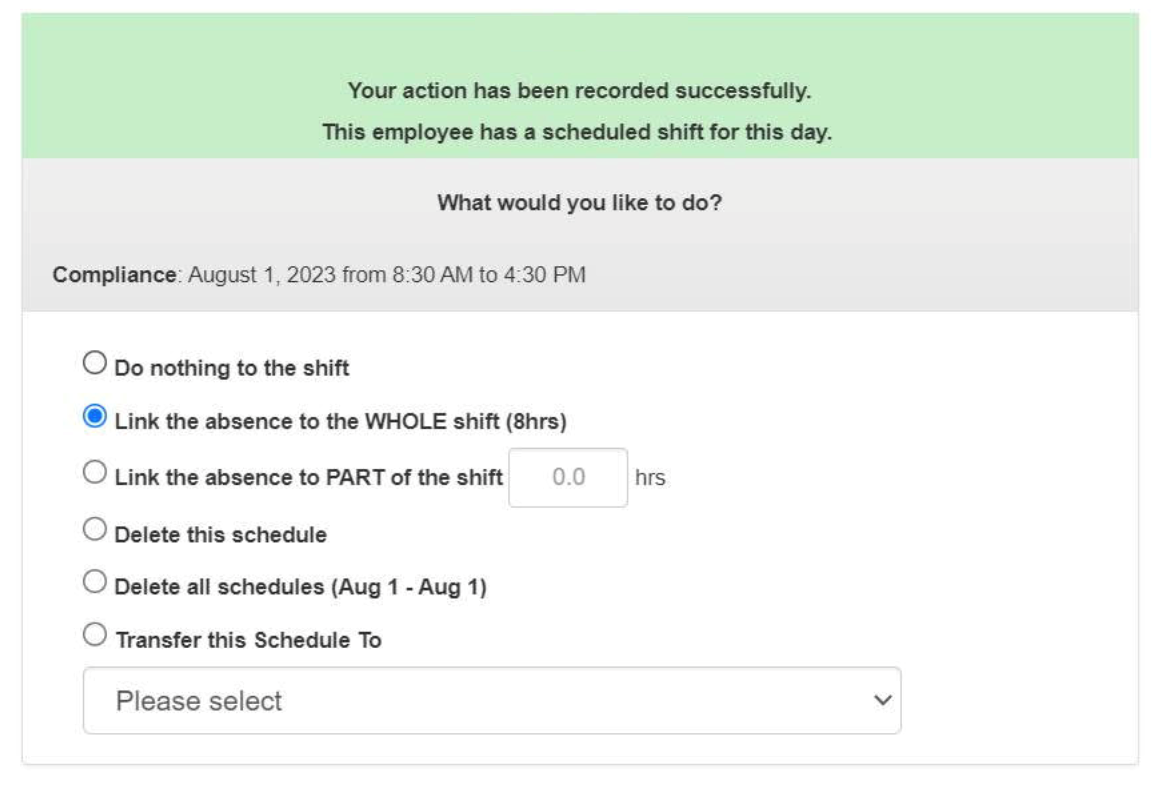
If you choose to link the WHOLE shift, then the entire shift will be removed from the time cards.
If you choose to link PART of the shift, then the hours entered will remain as the shift.
For example, you have an employee scheduled Friday from 8a-4p (8hr shift). In the morning they call in their child has to go to the doctors and they need to take 4hrs off. You can pick to link PART of the shift and leave the 12p-4p part of their shift available.
Search
Language switcher
Categories
-
Absence37
-
Access Restrictions9
-
Accounting5
-
Alerts30
-
App – Employees4
-
App – Punch Clock14
-
Availability13
-
Biometrics12
-
Chat6
-
Competency6
-
COVID7
-
Departments9
-
Did You Know5
-
Employee Management19
-
For Employees19
-
For Managers16
-
General29
-
Getting Started5
-
How-To17
-
HR Suite43
-
Messages21
-
Multiple Instances2
-
Offline Mode0
-
Payroll44
-
Printing3
-
Project Tracking5
-
Punch App2
-
Punch Clock2
-
Punching23
-
Reports21
-
Roles13
-
Scheduling78
-
Security23
-
Shifts9
-
Statutory Holidays12
-
Survey3
-
Time Cards60
-
Videos33
-
Vital Signs2
-
Walk Thru1
-
What's New57
-
Who's Working7